TL;DR
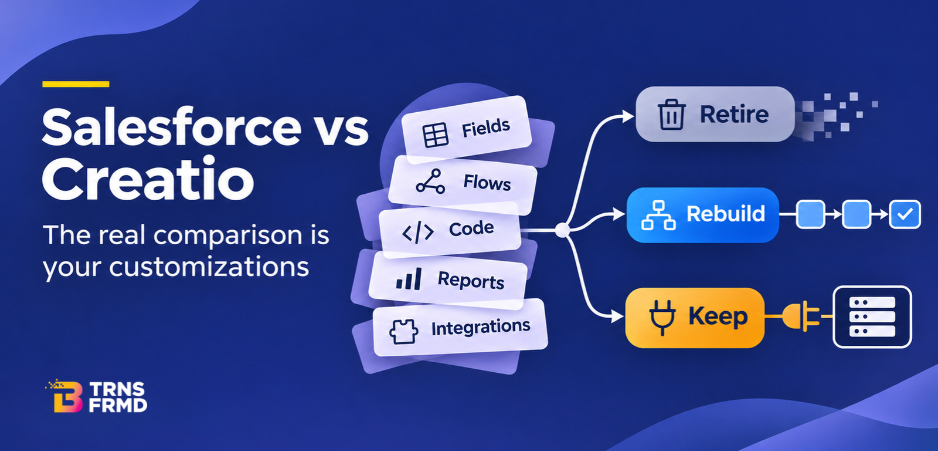
Customizations do not copy across platforms. Each is retired, rebuilt in no-code, or kept as an integration. Three tests sort every item: is it still used, still needed, and can no-code tools do it? Run this audit before comparing prices, since it sets a move’s real scope. One Caribbean financial group moved five business units onto one Creatio instance in seven sprints, automating 200+ workflows.
A Salesforce customization is any custom object, field, flow, code, report or integration added to the standard platform. Before a move to Creatio, each one is retired, rebuilt in no-code, or kept as an integration. That decision, made item by item, shapes the cost, timeline and risk of the whole migration far more than the license price does. Our Creatio vs Salesforce comparison sets the two platforms side by side. This blog covers the part most comparisons skip: the years of work already built into your org.
If you have run Salesforce for five years or more, your company almost certainly holds customizations nobody can fully explain. That is not a criticism of anyone. It is what happens when a platform grows alongside a business: a field for one campaign, a flow for one approval, a piece of code for one integration. Each made sense at the time. The question at migration is whether each one still earns its place.
What Is a Salesforce Customization?
A customization is anything your team or a partner added on top of the standard product. In most orgs, these fall into six groups:
- Custom objects and fields: data structures built for your business, such as a policy object or a region field.
- Flows and process automation: approvals, assignments, alerts and multi-step processes.
- Code: Apex classes, triggers and custom components written by developers.
- Page layouts and record types: how screens look for different teams.
- Reports and dashboards: the views leaders use to run the business.
- Integrations and installed packages: connections to ERP, billing, marketing and other systems, plus AppExchange apps.
Some of these are central to how you sell and serve customers. Others were built for a project that ended years ago. A migration is the one moment when you are forced to tell them apart, and that is an opportunity, not a chore.
Salesforce vs Creatio: Why Customizations Decide the Move
When teams first look at Salesforce vs Creatio, they usually compare per-user prices. That number is easy to find. The customization scope is not, and it drives most of the effort in a move: how many workflows to rebuild, how much data to map, how many integrations to reconnect and test.
In our blog on Salesforce renewal cost, we mapped the five cost lines of a CRM bill. Admin and developer time is one of them. Customizations are what that time is spent on. So an honest Salesforce vs Creatio comparison has two parts: what each platform costs to run, and what it costs to carry your existing customizations across.
This is also where the platforms differ in approach. Creatio positions itself as a no-code platform, where business users configure workflows, forms and rules without writing code. Its 10x release on July 15, 2026 added a Prompt Agent Designer, for creating AI Agents by describing them in natural language, and a Workflow Agent Designer, a visual tool for multi-step Agents that follow fixed logic. For a migration, that matters because it changes who rebuilds each customization: a developer, or the business team that owns the process.
How To Audit Your Customizations
The audit is the most valuable step in any migration, and it is the one most often rushed. Give it two to four weeks for a mid-sized org. Here is the order we follow:
- Export the inventory
List every custom object, field, flow, validation rule, Apex class, trigger, report, dashboard, installed package and integration. Salesforce Setup and standard metadata tools can produce most of this list.
- Record usage
For each item, note when it was last modified, last run or last viewed. A field that holds data in under 5% of records, or a report nobody has opened in a year, is a strong candidate to retire.
- Name a business owner
Every item needs a person who can say why it exists. An item with no owner is a signal, not a mystery to solve.
- Tag the process it serves
Lead routing, quoting, onboarding, service escalation. This turns a technical list into a business map.
- Flag dependencies
Note what breaks if the item is removed: other flows, reports or integrations.
- Mark outside connections
Anything that sends data to or receives data from another system goes in its own group. These become your integration list.
The output is one spreadsheet with a row per customization and columns for usage, owner, process, dependencies and connections. That spreadsheet is the real scope of your migration.
Retire, Rebuild, or Keep: How To Decide
With the inventory in hand, run three tests on every row. The answers place each customization in one of three paths.
| Test | Retire | Rebuild in no-code | Keep as integration |
| Still used? | No | Yes | Yes |
| Still needed by the business? | No | Yes | Yes |
| Can no-code tools do it? | n/a | Yes | Not needed: it connects to another system |
- Retire anything that fails the first two tests. Our view: retire more than feels comfortable. Every unused field you carry across must be mapped, migrated and tested, and then it clutters screens for years. If a team later finds it needs something you retired, rebuilding one item in no-code is quick.
- Rebuild anything that is used, needed and can be configured with standard no-code tools. This is usually the largest group, and it covers most flows, approvals, layouts and reports.
- Keep anything whose main job is to move data between your CRM and another system. The logic stays; the connection is rebuilt on the new platform.
See What a Move Could Save
Before you start the audit, find out what’s at stake. Enter your user count and current edition, and the calculator compares your Salesforce spend with a move to Creatio in a few minutes.
[Calculate My Salesforce Savings]
How To Rebuild CRM Workflows in No-Code
The most common mistake in a rebuild is translating old code line by line. Rebuild the process, not the code. Start from how the business works today, which is often different from how it worked when the original flow was written.
A practical approach to CRM workflow automation during a migration:
- Map the process on one page. Trigger, steps, approvals, outcome. If the map does not fit on a page, split it.
- Ask the owner what is missing. Teams often have manual workarounds around an old flow. The rebuild is the time to fold those in.
- Build in the no-code designer with the business owner in the room. CRM workflow automation works best when the person who owns the process can see and change it.
- Test with real records. Run each rebuilt workflow against live examples from the last quarter before go-live.
- Add AI Agents last. Get the fixed steps right first, then decide where an Agent adds value.
Our CRM process automation page shows how CRM workflow automation runs on one platform, with sales, service and approval workflows in the same place as customer data.
The payoff is in maintenance. Research affirms that Creatio customers saw a 37% reduction in total cost of ownership, which Creatio links to less reliance on external developers. Treat that as one study, published by the vendor, and test it against your own numbers.
The logic holds either way: when the business team can change a workflow, simple changes stop waiting in an IT queue. Good CRM workflow automation is the kind your own people can keep up to date.
Which Customizations Stay as CRM Integration Services
Some customizations are not really CRM features at all. They are connections: the link to your ERP, billing system, data warehouse, marketing platform, core banking system or contact center. These do not get retired or rebuilt as screens. They get reconnected, and that work falls under CRM integration services.
For each connection, document four things:
- The system on the other side and who owns it.
- The direction of data: into the CRM, out of it, or both.
- The frequency: real time, hourly, nightly.
- The fields that move, and which system is the source of truth for each.
Creatio connects to other systems through REST APIs, and its 10x release added support for Model Context Protocol (MCP) so AI Agents can work with existing systems.
Creatio also works with contact center platforms such as Genesys, NICE, Five9 and Amazon Connect through partner connectors. Confirm the specific connectors you need early, because CRM integration services are usually the longest-running thread in a migration plan.
Our advice: Test every integration in a sandbox with production-like data before go-live, and plan CRM integration services as their own workstream with their own owner. When integrations slip, the whole timeline slips with them. Well-scoped CRM integration services keep the rest of the move on schedule.
What a Planned Move Looks Like: A Financial Group Example
A Caribbean financial group had grown faster than its systems. Each of its five business units ran sales, marketing and service on separate tools, so no one had the full customer picture. The group wanted one platform across all five units.
We brought all five units onto one Creatio instance, one unit at a time, in seven sprints. The results:
- 5 business units on one instance
- 200+ workflows automated
- 2M+ records migrated
- 17 territories covered
- 7 sprints
Two choices made the difference. First, the audit came before the build, so each sprint started with a clear list of what to retire, rebuild and keep. Second, the rollout went one unit at a time, so lessons from the first unit made each later sprint faster. Read the full case study here.
Start With the Audit
The Salesforce vs Creatio question is rarely settled by price alone. It is settled by what you would carry across, and what you could finally leave behind. Start with the audit, and every later decision gets easier.
B-TRNSFRMD Consulting LLC is a certified Creatio partner. Our PATH TO OUTCOME™ methodology starts every migration with the business outcome you need, then works back to the customizations, workflows and integrations that get you there, one sprint at a time.
Talk It Through Before You Renew
Book an assessment with us and we’ll look at your org, your customizations and your renewal date, then show you what a move would take and when to start. Book an Assessment TODAY
Not ready to talk yet? Get the AI-Native CRM Buyer’s Guide for the full framework you can use to compare platforms.
Frequently Asked Questions
- What is a Salesforce customization?A customization is anything added to the standard platform: custom objects and fields, flows and automation, code, page layouts, reports and integrations. Each one met a business need at some point. Before a migration, each is reviewed to decide whether it is still used, still needed, and where it should live next.
- Do Salesforce customizations transfer to Creatio?Not directly. Custom code and configuration are platform-specific, so they are not copied across. Each needed workflow is rebuilt in the new platform's no-code tools, and unneeded ones are retired. An audit comes first, so years of unused customization do not follow the business into the new system.
- How do you decide what to keep, rebuild or retire?Use three tests: is it still used, is it still needed by the business, and can standard no-code tools do it. Unused items are retired. Needed items that no-code tools can cover are rebuilt. Items that connect to outside systems are kept as integrations.
- How long does a CRM migration take?It depends on scope, data volume and the number of business units. One financial group moved five business units onto a single Creatio instance in seven sprints, rolled out one unit at a time, with 200+ workflows automated and 2M+ records migrated. Scope the audit first, then plan the sprints.
- Is Creatio really no-code?Creatio describes itself as a no-code platform where business users configure workflows, forms and rules without developers. Complex integrations can still need technical work. Ask any vendor to demonstrate the specific workflows you rely on, built by a business user, before you commit to a platform.
- What does it cost to maintain CRM customizations?Maintenance shows up as admin and developer time, consultant fees for changes, and delays when a simple change waits in an IT queue. Nucleus Research reported that Creatio customers saw a 37% reduction in total cost of ownership, linked to less reliance on external developers. Creatio published the research.