

Most CRM projects do not fail during implementation. They fail in the 90 days after go-live — when the real test begins: will your teams actually use the platform, adapt their workflows to it, and extract measurable business value from it?
For mid-market financial services and healthcare organizations, this window is especially critical. The margin for wasted investment is thinner, regulatory and operational stakes are higher, and competitive pressure from digital-first challengers means a six-month ramp before the system delivers results is not acceptable.
This is the pattern B-TRNSFRMD sees repeatedly in Creatio CRM implementations across financial services and healthcare. The platform is capable. The configuration at go-live is not built to last. And the 90 days immediately after launch determine whether that investment compounds — or quietly stalls.
Why Creatio CRM Implementations Fail After Go-Live — And What the Data Says
The post-go-live failure pattern is well-documented. Gartner has reported a CRM failure rate of 50%. Forrester puts it at 47%. Forrester Research identifies three root causes that together account for the majority of failures: lack of business strategy (48%), lack of process change (45%), and lack of executive support (40%).
None of these failures happen during implementation. They happen after it — in the weeks and months when no implementation partner is watching.
The first 90 days post-go-live are where habits form. If your relationship managers, underwriters, care coordinators, or service representatives find the system adds friction rather than removing it, adoption stalls. Workarounds multiply. Data quality degrades. Within two to three years, you are evaluating platforms again — having extracted a fraction of the value the original investment was designed to deliver.
Understanding why this happens starts with understanding what a correctly configured Creatio CRM environment actually requires. We covered the role of no-code flexibility in preventing this drift in an earlier post — the short version is that platforms teams cannot adapt themselves will always fall behind the organization.
What Creatio CRM for Financial Services Actually Requires
Mid-market financial services organizations — community banks, credit unions, regional insurers, wealth management firms, and regional lenders — have specific CRM requirements that generic enterprise platforms rarely address without significant customization overhead.
- A unified customer view. A client who holds a checking account, a mortgage, and a brokerage account should not live in three separate systems. Unified customer data is what enables cross-sell, relationship deepening, and the advisor-led conversations that differentiate mid-market firms from digital-only competitors.
- Configurable without developer dependency. Compliance requirements, product lines, and customer journeys are specific to each organization. The CRM needs to be one your operations team can adapt without an IT ticket for every change.
- GLBA and SOC 2 alignment from day one. Compliance configuration is not a post-launch activity. Role-based access controls, field-level security, and audit trails must be in place before any production data is loaded.
- Workflow automation that reflects actual operations. Not generic pipeline stages that require months of developer work to map to your specific loan origination, onboarding, or servicing processes.
According to Nucleus Research’s independent April 2025 report, How Creatio’s No-Code Capabilities Reduce TCO and Drive Faster TTV, organizations migrating to Creatio from legacy CRM platforms experienced up to 70% faster implementation timelines, a 37% reduction in total cost of ownership, and a 61% reduction in lead response time. These are independently verified outcomes — not vendor-reported estimates.
The platform delivers these results when the implementation is structured correctly. When it is not, the same capability gap that defeats other CRM deployments appears in Creatio environments too.
What Healthcare CRM Configuration Looks Like When It Works
Healthcare CRM implementation follows the same post-go-live failure pattern as financial services, but the specific configuration requirements are different.
A correctly configured Creatio CRM environment for healthcare handles patient journey mapping from referral through appointment to follow-up care — without requiring a separate system at each stage. Care coordination workflows route tasks to the right team member based on patient status, priority, and service line, and operations teams can update that routing logic without submitting a development request.
HIPAA-aligned data handling — role-based access controls, audit trails, and field-level security — must be configured before patient data enters the system. EHR integration with systems like Epic and Cerner should augment clinical operations, not replace them. Reporting needs to tell operations leaders where patient drop-off is happening and why, not just surface aggregate satisfaction scores.
Creatio’s no-code workflow engine makes this level of configuration achievable without a lengthy developer engagement. This is why healthcare organizations moving from legacy CRM platforms to more adaptable architectures consistently see faster time-to-value — the system can be shaped to clinical reality rather than forcing clinical workflows to fit a rigid template.
3 Decisions in the First 90 Days That Determine Creatio CRM ROI
These three decisions apply to every Creatio CRM implementation. Organizations that get them right see compounding returns. Those that do not spend the following 18 months trying to recover.
Decision 1: Configure Deeply Before Users Log In for the First Time
Generic out-of-the-box Creatio views are not built for your organization. The first 30 days should be spent configuring dashboards, pipeline stages, task routing, and data fields to mirror exactly how your specific teams operate today. With Creatio’s no-code builder, this configuration is achievable without a developer-heavy sprint.
Organizations that launch with default configurations and plan to “fix it later” create the friction that kills adoption. The workarounds that form in week one become the cultural default by month three.
Decision 2: Train by Role, Not by Feature
Blanket CRM training consistently underperforms. Loan officers, patient access coordinators, and relationship managers have different workflows and different stakes in the system. Training must be role-specific and workflow-specific, reinforced through guided adoption support in the first 30 days — not delivered as a one-time session before launch.
Forrester Research identifies inadequate training and resistance to change as two of the top drivers of CRM implementation failure. As we explored in our post on AI-driven CRM and next best actions, organizations extracting the most value from their CRM are those where teams trust the system enough to act on its recommendations — and that trust is built in the first 30 days.
Decision 3: Measure Leading Indicators from Week One
Most organizations wait until quarter-end to assess CRM adoption. By then, bad habits are entrenched. The first 90 days should include weekly tracking of login rates by team, data completeness percentages, workflow completion rates, and task closure times.
These leading indicators tell you whether ROI is on track long before revenue metrics appear in your reporting. They also tell you precisely where to intervene before a single team’s workaround becomes an organization-wide norm.
Working With a Creatio CRM Implementation Partner
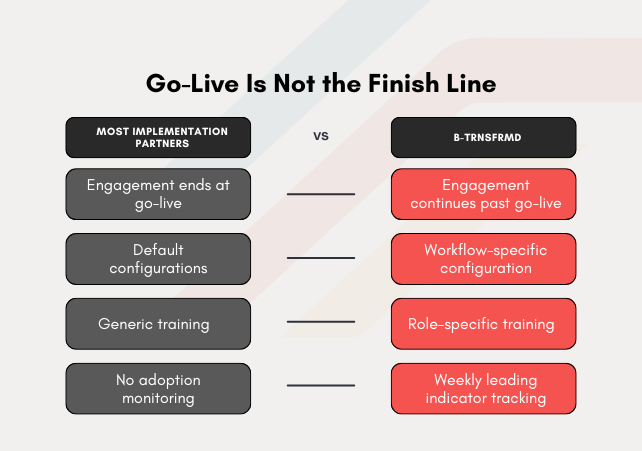
The three decisions above are not complicated in concept. They are consistently under-executed in practice — because most organizations treat go-live as the finish line and most implementation partners structure their engagement accordingly.
The organizations that extract measurable ROI from their Creatio CRM investment in the first 90 days share one characteristic: they have implementation support that continues past go-live, not one that winds down at it. Pre-launch configuration built around actual workflows, not defaults. Training built around how specific roles operate, not how the platform is structured. And a measurement discipline that tells them where adoption is at risk before quarter-end.
Creatio’s no-code architecture makes course-correction fast when something is not working. Configuration that would take weeks in a developer-dependent platform can be updated in hours. That agility is only an advantage if someone is monitoring the signals that tell you a correction is needed.
B-TRNSFRMD is a Creatio CRM implementation and optimization partner with direct experience in financial services and healthcare environments. If your Creatio CRM environment has been live for more than 90 days and is not performing at the level your investment requires, the conversation that surfaces why takes 30 minutes.
Talk to a Creatio implementation expert at btrnsfrmd.com/creatio →