
TL;DR
Most “AI-powered” CRMs still rely on legacy architecture with AI features layered on top. An AI-native CRM is different: AI is built into the data model and workflows from the ground up. The real test is simple: can the platform act on your data autonomously, or does it still require multiple tools to appear intelligent? B-TRNSFRMD helps enterprise teams make that distinction before renewal.
AI in customer service usually means artificial intelligence applied to one task at a time: a chatbot, ticket triage, sentiment tagging, a summary an agent didn’t have to write. It’s almost always sitting on top of a CRM that predates it. An AI-native CRM platform is a different thing entirely. AI is built into the data model, the workflow engine, and how decisions get made, not added in later as a plug-in. Vendors blur the two on purpose. Buyers evaluating a seven-figure contract don’t have that luxury.
What “AI In Customer Service” Really Means in 2026 (And Where the Confusion Starts)
Interest in AI in customer service has climbed for three years running, and it’s easy to see why. Every support platform on the market now ships some version of it. A bot fields tier-one questions. A summarizer condenses a call nobody wants to relisten to. A routing engine guesses which queue a ticket belongs in. None of that is fake, and most of it genuinely helps. What it isn’t, in almost every case, is native to the system underneath it.
The numbers back this up. As recently as 2024, fewer than a quarter of commercial leaders had formally adopted generative AI across their sales and service organizations. Weekly usage among frontline reps has since passed four in ten, almost entirely inside the CRM itself. That’s the gap worth paying attention to: people are leaning on AI powered customer service tools constantly, while the platform decisions behind those tools haven’t caught up to how they’re actually being used.
So here’s the distinction that matters. AI in customer service is a capability. An AI CRM platform is an architecture. You can have one without the other, and most companies do.
The AI Feature Trap: Why Most CRMs Have AI Powered CRM Features, Not an AI-Native Core
Most enterprise buyers don’t get misled on purpose, they get misled through category collapse. A legacy CRM ships a generative assistant, rewrites its release notes around AI, and starts calling itself an AI powered CRM. The assistant might actually be good. But underneath it, records are still siloed by module, workflows still run on static rules, and the “AI” usually works by calling out to a model rather than being part of how the data itself is structured.
The market has split into two real camps:
- AI-augmented CRMs: established platforms that added generative or predictive features to a data model built for people typing things into fields, not for machines reasoning over them.
- AI-native CRM platforms: newer or rebuilt systems where the data model itself is designed for AI to read, predict, and act on, with automation as the default instead of an extra step.
The AI powered CRM slice of the market is growing well ahead of CRM spending overall. Market analysts put it at roughly $15 billion in 2023, on pace to more than triple by the early 2030s. That growth is real. It’s also easy to mistake for AI-native, when most of the time it’s AI-augmented software with a new label on the box.
The Real Cost of a Legacy CRM With AI Bolted On
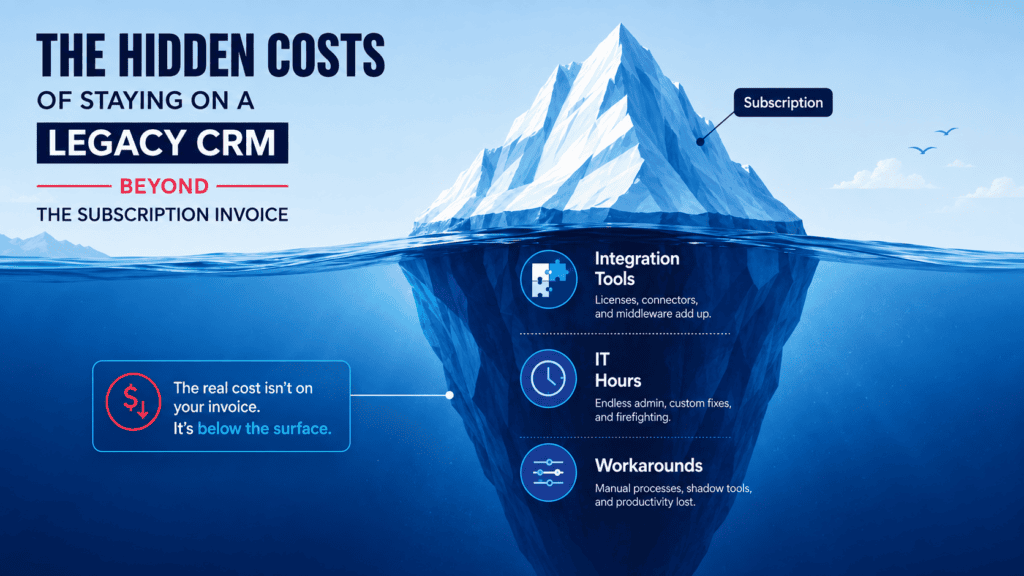
The cost of an AI in customer service feature sitting on fragmented data doesn’t show up on the invoice. It shows up somewhere else, usually in three places.
- Prediction accuracy suffers. A model is only as good as the data it can see. When customer, case, and product data live in separate modules with separate permissions, the AI handling a support ticket can’t see the full picture a human agent would have pieced together by hand.
- Business process automation stalls. Teams end up building crm workflow automation around the AI feature instead of through it, a patchwork of Zapier-style connectors linking the chatbot to the ticketing system to the reporting dashboard, because the platform underneath never unified any of it.
- Total cost of ownership climbs. Nearly every enterprise with revenue above a billion dollars already runs a CRM, and most of them now run some AI-augmented functionality inside it. Few budgeted for the integration debt that comes with retrofitting AI onto a platform that predates it.
None of this means AI powered customer service tools are bad. It means the platform underneath them is doing more work than it should to make those tools worth using, and enterprises are footing that bill in implementation time, agent workarounds, and answers that don’t match across channels.
AI Feature vs. AI-Native Platform: A Side-by-Side Look
| Dimension | AI Bolted Onto a Legacy CRM | True AI-Native CRM Platform |
| Data model | Built for manual entry; AI reads a partial picture | Built for machine reasoning from the ground up |
| Workflow design | Static rules with an AI layer added on top | Adaptive workflows AI can rewrite based on outcomes |
| Where AI lives | A chatbot or assistant bolted onto existing screens | Embedded in every record, process, and decision point |
| Integration overhead | High, AI tools stitched together after the fact | Low, automation is native, not assembled |
| Time to value | Months of configuration around the AI feature | Weeks, because the architecture doesn’t fight the AI |
| Governance | Uneven; depends on which module the AI touches | Consistent, because it is designed in from day one |
Inside an AI-Native CRM Platform: What Actually Changes on Day One
The clearest examples of an AI-native CRM platform aren’t incumbents that bolted on a chatbot. They’re platforms built around AI and no-code workflow design from the start, where automation and prediction are the default rather than an add-on.
Creatio, for one, now positions its entire CRM line this way: an AI-native CRM built to run customer and operational workflows as one agentic system instead of a stack of connected tools. The label matters less than what it changes in practice, how fast a team can stand up new automation without waiting on a developer.
This is exactly the gap UnshacklAI, B-TRNSFRMD’s legacy CRM migration program, is built to close.
We handle the migration itself — moving a company off a legacy, AI-augmented CRM and onto an AI-native platform like Creatio — and then stay on for the ongoing optimization most vendors and most in-house teams don’t have the bandwidth for: configuring the AI features that shipped with the platform, tuning workflows as real usage patterns emerge, and closing the gap between what the platform can do and what it’s actually doing.
The migration gets you onto the right architecture. The ongoing optimization is what makes that architecture actually pay off.
Three things shift immediately once a platform is actually AI-native:
- Data entry stops being mandatory. Calls, emails, and case notes populate records on their own instead of waiting on a rep to log them.
- Insight stops being something you go looking for. Instead of a manager pulling a dashboard, the platform flags churn risk, service backlogs, or process bottlenecks before anyone asks.
- Automation stops stopping at the ticket. Business process automation moves out of a separate tool and becomes part of how the CRM runs, start to finish.
This is where AI in customer service and an AI CRM platform actually meet up, the way vendors have promised for years but rarely delivered: the chatbot, the agent-assist tool, and the case data behind them are one system, not three tools passing notes through an API.
Calculate What an AI-Native CRM Migration Is Actually Worth
Before your next CRM renewal or RFP, it helps to know exactly which category you’re buying into, whatever the vendor calls itself — an AI powered CRM or otherwise. B-TRNSFRMD’s Creatio Migration Savings Calculator estimates what moving from a legacy, AI-augmented CRM to a true AI-native CRM platform is actually worth — based on your current CRM spend, integration overhead, and the manual workarounds an AI feature bolted onto old data can’t fix.
See Where Your Own Architecture Stands
If any part of this looked familiar, the fastest way to find out whether your CRM is actually AI-native or just running AI features on top of a legacy core is a direct conversation, not another vendor deck competing for attention with everything else on your plate.
Talk to B-TRNSFRMD about your Creatio environment to see where the real architecture stands.
Frequently Asked Questions
- Is my CRM AI-native or just AI-enabled?One question settles it: can your CRM run a multi-step process start to finish without someone connecting separate tools by hand? If the AI in customer service features you rely on sit on top of integrations layered over an older data model, you're AI-enabled. If AI is part of the data model and workflow engine itself, you're AI-native.
- What does AI in customer service actually look like day to day?In an AI-augmented setup, it's a chatbot fielding tier-one questions and a summarizer condensing calls, both sitting on top of screens that predate them. In an AI-native CRM platform, it's cases routing, prioritizing, and partly resolving themselves, with agents stepping in only where judgment actually matters.
- What's the difference between an AI-augmented CRM and an AI-native CRM platform?An AI-augmented CRM adds generative or predictive features to a data model that was built for manual entry, not for machines reasoning over it. An AI-native CRM platform is designed the opposite way — the data model itself is built for AI to read, predict, and act on, so automation is the default instead of an extra step. The gap between AI powered CRM marketing and an actual AI CRM platform almost always comes down to this one architectural difference.
- How does B-TRNSFRMD help a company move from a legacy CRM to an AI-native platform?B-TRNSFRMD runs the migration end to end — auditing the current CRM's data model and workflows, mapping what has to move versus what has to be rebuilt for an AI-native CRM platform, and executing the migration to a platform like Creatio. The work doesn't stop at go-live: we stay on as the team handling ongoing optimization, so the AI-native capabilities you migrated for actually get configured, adopted, and tuned instead of sitting unused the way most post-implementation AI features do.
- What does an AI-native CRM platform look like in practice?Three things change immediately. Data entry stops being mandatory, since calls, emails, and case notes populate records on their own. Insight stops being something a manager has to go looking for, since the platform surfaces risk before anyone asks. And business process automation moves out of a separate tool and becomes part of how the CRM runs, start to finish — which is where AI in customer service and an AI CRM platform actually converge.
- Does B-TRNSFRMD only work with Creatio, or other CRM platforms too?Creatio is one of the platforms we're certified on, but B-TRNSFRMD's legacy CRM migration and optimization work isn't Creatio-exclusive — we support the same architecture evaluation and ongoing optimization across other platforms our clients run.