
TL;DR
The legacy CRM migration partner you pick will shape the result more than the platform will. A good one moves you to Creatio CRM in stages, so sales and service keep running while data, workflows, and AI agents come across piece by piece. Plan on roughly 12 to 16 weeks. Before signing, push hard on data validation, quote exclusions, and
post-launch support.
CRM migrations rarely fail because of the software. They fail in the gap between kickoff and the first Monday after go-live, when a sales rep logs in and can’t find the account history she has leaned on for six years. Closing that gap is the whole job of a legacy CRM migration partner.
If you’re thinking about moving to an AI CRM platform like Creatio, the firm you hire will matter more than any feature checklist. At B-TRNSFRMD, we see the same pattern across 60+ CRM migrations and transformations. A great platform with a careless migration leaves you with frustrated users. An ordinary platform with a careful migration leaves you with a team that actually uses it.
Here’s what a good partner should do, how a phased move works, and what to ask before
you sign.
What a Legacy CRM Migration Partner Actually Does (Hint: Moving Data Is the Easy Part)
A legacy CRM migration partner plans and runs your move from an older CRM to a new one. Data is part of it. So are workflows, integrations, training, and the messy weeks after launch.
The work covers:
- Auditing what you have, including custom fields nobody remembers creating
- Mapping old objects like accounts, contacts, deals, and tickets to the new data model
- Rebuilding workflows so old workarounds don’t come along for the ride
- Connecting ERP, email, telephony, and data warehouse systems
- Training your team and staying close after go-live
A reseller sells you licenses. A Creatio implementation partner is accountable for the change itself. If a proposal spends five pages on licensing and half a page on your data, that tells
you something.
Why Rip-and-Replace Is the Wrong Plan (and Why It Still Gets Pitched)
Rip-and-replace sounds tidy. Pick a weekend, flip everything over, and start fresh on Monday. The trouble is that every risk in the project lands on that one date.
| Rip-and-Replace | Phased Migration | |
| Cutover | One date, every user at once | Staged by team or business unit |
| Data checks | Often squeezed before the deadline | Full-volume test run before go-live |
| Safety net | Limited once the old system is off | Legacy CRM stays available in read-only mode |
| User impact | Everyone learns at the same time | Teams come on board in waves |
| Problems surface | After launch, in front of customers | Inside each phase, before the next begins |
Phased doesn’t have to mean slow. It means each stage gets tested before the next one starts. One of our clients, a Caribbean financial services group, brought five business units across 17 territories onto a single Creatio CRM instance this way. They moved one unit at a time over seven sprints, and nobody had to stop selling while it happened (read the full story).
The Four Stages of a Phased Migration to Creatio CRM (and Where Projects Usually Go Sideways)
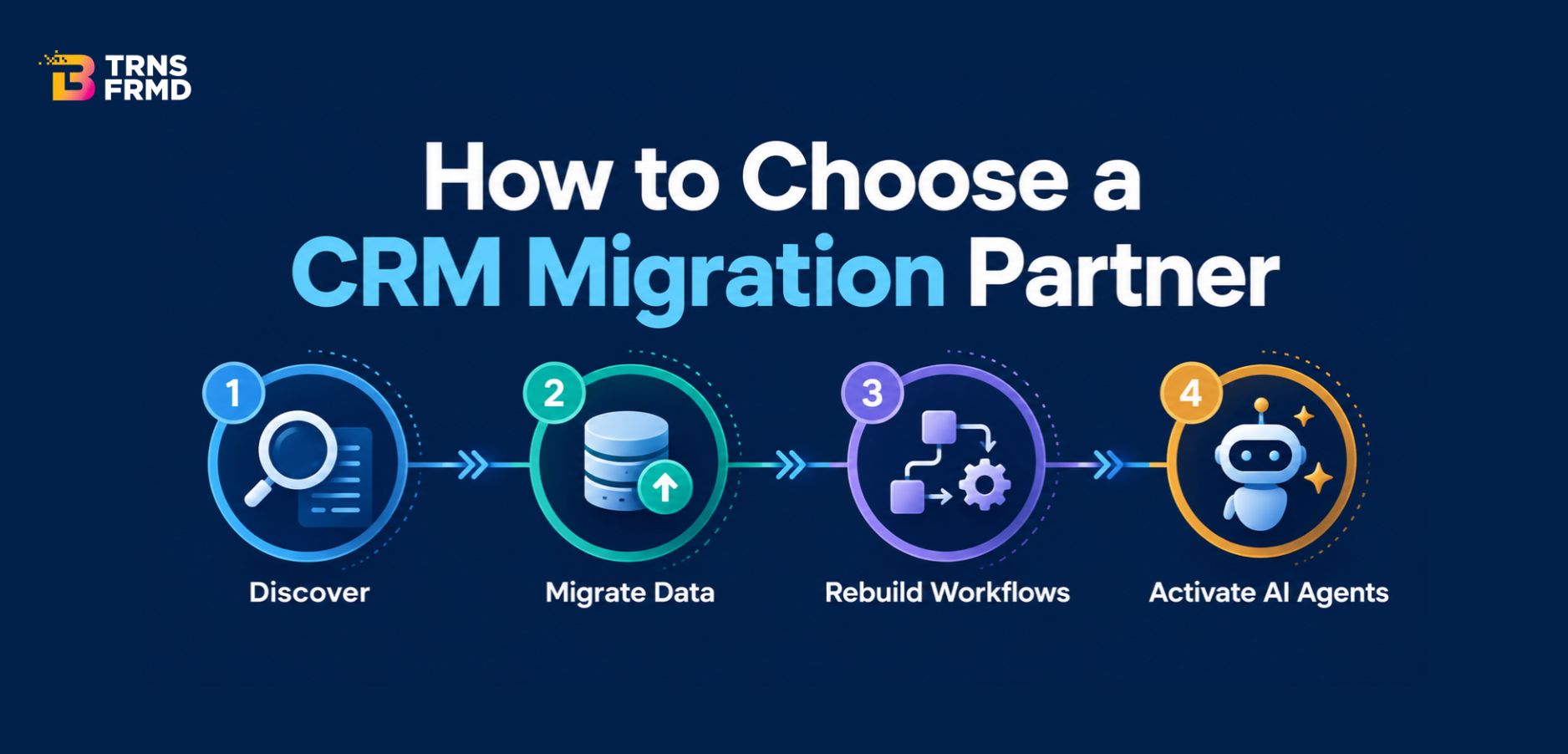
Our migrations follow four stages. The details change. The order doesn’t.
| Stage | What Happens | Watch Out For |
| 1. Discovery | Audit data, fields, workflows, and integrations; agree on scope and a fixed quote | Shadow spreadsheets and custom fields nobody mentioned |
| 2. Data Migration | Map core objects to the Creatio CRM data model; run a full-volume test migration | Duplicates and history that don’t map cleanly |
| 3. Workflow Rebuild | Rebuild processes in no-code and test them with real users | Copying old workarounds into the new system |
| 4. AI Agent Activation | Switch on AI agents once data is clean, with human approval steps | Turning AI on before the data is ready |
- Discovery is the stage everyone wants to rush. It’s also the one that saves the most money. This is where you find the 40 custom fields someone built years ago and the spreadsheet finance still treats as the real customer list.
- Data migration should be verified twice before anything goes live. We run a full-volume test first and then the real cutover. Afterward, the old CRM stays read-only as a backup. On the financial services project, that meant more than 2 million records landing in one unified data model, plus a daily sync from the bank’s on-premise data warehouse.
- Workflow rebuild is where an AI CRM platform starts to pay off. Creatio is no-code, so business teams can adjust forms and rules after launch without waiting in the IT queue. That same client finished with more than 200 automated workflows.
- AI agent activation comes last on purpose. An AI CRM platform can only work with the data you give it. Switch agents on too early and they will act, confidently, on duplicate records.
Questions to Ask a Migration Partner Before You Sign
Most Will Dodge #3.
- How many migrations to this platform have you led, and can we speak with one of those clients?
- How do you validate our data before go-live, and who signs off on it?
- What does your fixed quote leave out?
- What happens to our old CRM after cutover?
- Who supports us after launch, and what are the response times?
- When do AI agents get switched on, and who approves what they’re allowed to do?
A partner who knows the work answers these without hesitating. If the cost and data answers are mostly “it depends,” keep asking. Question three matters most, because exclusions are where budgets quietly double.
How B-TRNSFRMD’s PATH TO OUTCOME™ Applies to a
CRM Migration
PATH TO OUTCOME™ stands for Plan, Align, Transform, Harness. It exists because a CRM project can go live on schedule and still fail if nobody agrees on what it should improve.
| PATH Stage | Migration Stage | What It Means for You |
| Plan | Discovery | Scope, cost, and success metrics agreed before work starts |
| Align | Data Migration | Stakeholders sign off on data mapping and the cutover plan |
| Transform | Workflow Rebuild | Processes redesigned for how your teams work now |
| Harness | AI Agent Activation | AI and automation tied back to the metrics set in Plan |
Most migrations take 12 to 16 weeks, depending on data volume and the number of integrations. Across our Creatio implementations, teams have reached full user adoption within 90 days of go-live. If you’re not sure a move makes sense yet, UnshacklAI puts a number on what your current CRM really costs. More on our approach lives on our Creatio page.
Know Your Number Before You Pick a Partner
Before you compare partners, work out what staying put is costing you. Our AI-Native CRM Buyer’s Guide walks through how to evaluate an AI CRM platform. For a firm number on the move itself, start with an UnshacklAI assessment.
Frequently Asked Questions
- What does a legacy CRM migration partner do?A legacy CRM migration partner plans and runs your move from an old CRM to a new one, from the first audit to the weeks after launch. That covers data, workflows, integrations, and training. The better ones also check whether it improved anything.
- How long does a legacy CRM migration to Creatio take?legacy CRM migration to Creatio usually takes about 12 to 16 weeks. Data volume, data quality, and the number of connected systems drive most of the range. Larger rollouts run in sprints, one business unit at a time.
- Will we lose our data and history in a migration?No. A well-run migration should not lose your data or history. Data gets checked in a full-volume test run and again at cutover. Your old CRM also stays available read-only, so nothing disappears.
- Do we have to rip and replace everything at once?No. You don’t have to rip and replace everything at once, and we’d advise against it. A phased migration moves one team or business unit at a time, so most people keep working in a familiar system until their turn comes.
- What should a migration partner deliver after go-live?A good Creatio implementation partner should offer support with clear response times, hands-on help with adoption, and regular check-ins on the metrics you agreed at the start. Since Creatio CRM is no-code, your team should also be able to adjust workflows on its own.
- What affects the cost of a legacy CRM migration?The cost of a legacy CRM migration depends mostly on data volume, data quality, and integrations. Custom objects and older on-premise systems add scope. Ask for a fixed quote after the assessment so you know the figure before you commit.