
Go-live day tends to feel like a finish line. The portal is live, the team is trained, and tickets are moving. The problem is that go-live is actually closer to the starting line — and most organizations do not realize it until someone pulls a six-month report and the numbers tell an uncomfortable story. Freddy AI is not routing accurately. The same ticket types flood the queue every week. SLA attainment has not moved.
This is the post-go-live gap. It is not a Freshservice problem. It is a configuration problem.
According to the Forrester Total Economic Impact Study commissioned by Freshworks (July 2023), fully configured Freshservice environments deliver a 356% ROI over three years. The Freshworks 2025 Benchmark Report — 10,743 IT teams, 180 million tickets — found Freddy AI Copilot users saw a 76.6% reduction in resolution time and a 65.7% ticket deflection rate.
Those numbers do not happen at go-live. They happen when someone goes back in and does the Freshservice post-implementation optimization work that implementation timelines never leave room for.
The Post-Go-Live Gap Most IT Teams Never Close
Implementation projects are optimized for shipping, not performance. Teams configure just enough to make the platform functional — basic ticket categories, a default SLA policy, a serviceable catalog — then move on. The platform runs. It just does not perform.
The gap compounds quietly. Miscategorized tickets train Freddy AI on bad data, making routing less accurate over time. A knowledge base that is never reviewed grows stale and drives ticket volume up. A single SLA policy applied to everything produces averages that do not reflect how work is actually done.
Freshservice post-implementation optimization is where the platform's real value gets unlocked. The five areas below are where that gap lives — and where the work gets done.
What Fully Configured Freshservice Looks Like
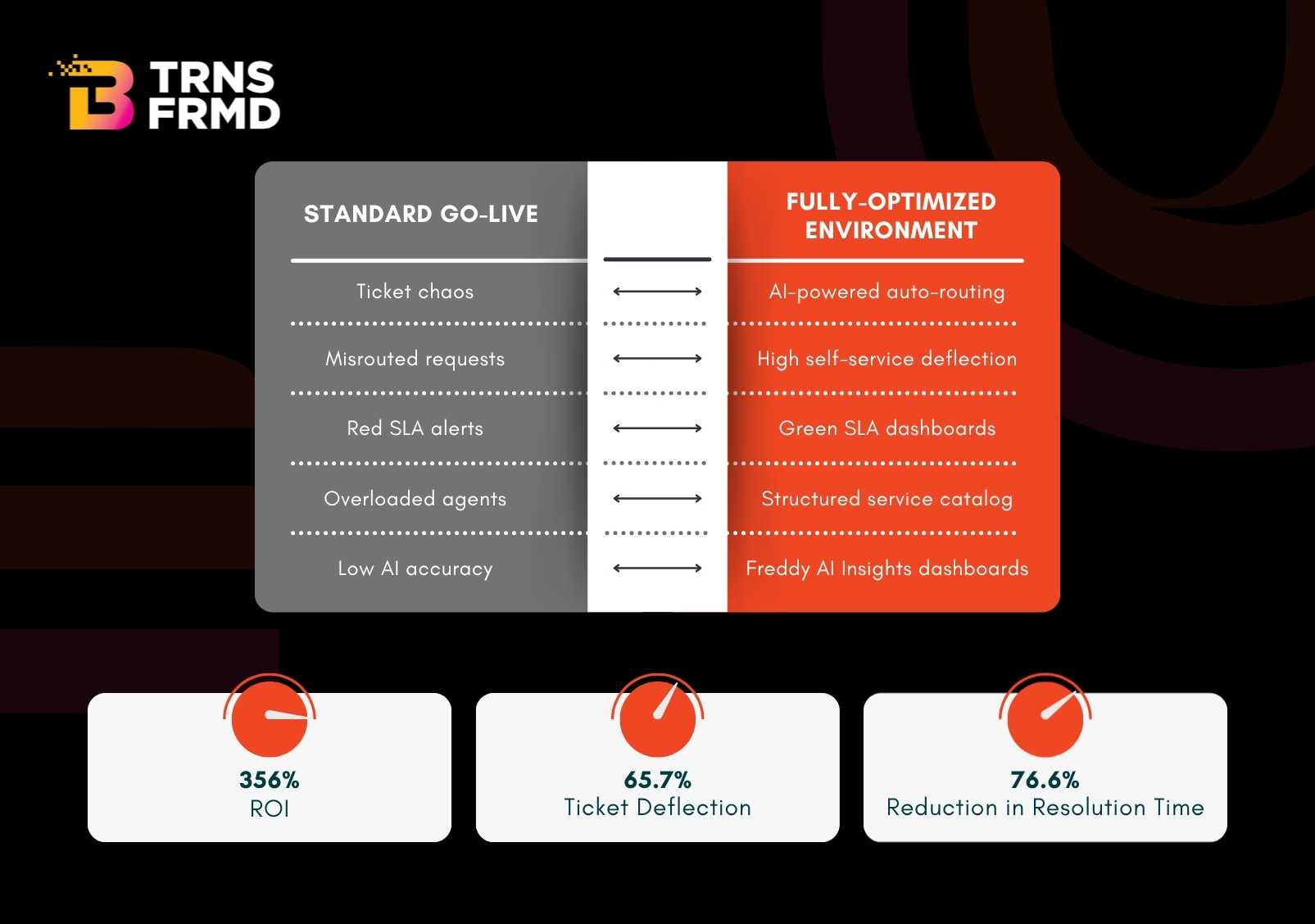
1. Freddy AI Routing and Suggestion Accuracy
Freddy AI is two distinct tools: Freddy AI Agent handles conversational employee requests without human involvement; Freddy Copilot assists Agents with suggested responses, ticket summaries, and knowledge drafts. Both underperform when they have not been tuned to your organization's context.
In a properly configured environment, auto-routing rules reflect your actual ticket taxonomy — not Freshservice defaults — so tickets reach the right team on first assignment. Freddy AI Agent, connected to a current knowledge base, resolves routine requests without Agent involvement. Freddy AI Insights, generally available since June 2025, lets IT leadership query service data in plain language rather than waiting on scheduled reports.
Routing accuracy does not self-correct. It requires someone auditing misroutes, adjusting categorization logic, and feeding corrections back into the system.
2. Service Catalog Structure — Multi-Team, Multi-Department
Most post-implementation catalogs fail in one of two directions: too sparse, forcing employees to over-describe their requests, or too cluttered, causing them to give up and email IT directly.
A properly structured catalog is built around how employees think about their problems, not how IT organizes its teams. In mature environments, it extends to HR, Finance, Facilities, and Legal through Freshservice's Enterprise Service Management capabilities — each department with its own workflows and portal views. Structured intake forms eliminate the back-and-forth that inflates resolution times.
3. SLA Automation by Ticket Type and Urgency
Most implementations apply one SLA policy to everything, averaging together P1 incidents, service requests, HR tickets, and IT submissions as though they represent the same work. Freshservice supports multiple policies differentiated by ticket type, department, urgency, and business hours — a capability most deployments never use.
Fully configured SLA automation means escalation rules fire before a breach, not after. The priority matrix reflects your organization's actual definition of urgency, not generic defaults. And reporting breaks down SLA attainment by business unit — which is what transforms service desk data into a budget conversation.
4. Knowledge Base Governance
Freddy AI Agent's deflection rate is directly limited by the quality of the knowledge it draws from. Stale articles, inconsistent formatting, and poor categorization degrade AI accuracy — and the effect compounds over time.
The knowledge base needs to be treated as living infrastructure, not a go-live deliverable. Articles structured for AI consumption — specific resolution steps, terminology that matches how employees describe problems — sustain deflection. Freddy Copilot's article generation feature lets Agents draft new knowledge directly from resolved tickets, closing the gap between a fix being found and its availability for self-service.
5. Reporting That Connects to Business Outcomes
Ticket counts and average response times serve service desk managers. They don’t support a CIO conversation about whether the ITSM investment is paying off.
Fully configured reporting gives IT Directors what they need to take upstairs: cost-per-ticket trends, self-service adoption by department, and SLA attainment by business unit. According to the Freshworks 2025 Benchmark Report, AI-enabled environments reach 65.7% deflection and 76.6% resolution time reduction. Those are the benchmarks a properly configured environment should be measured against — not just internal year-on-year comparisons.
How the Post-Go-Live Gap Gets Closed — The Nine-Week OptimizeAI Program
B-TRNSFRMD's OptimizeAI program is a structured nine-week engagement for organizations that have deployed Freshservice and want to close the performance gap. It is not a reimplementation — it is targeted configuration work across the five areas above, delivered by consultants who specialize in the Freshworks ecosystem.
- Weeks one and two — Discovery and baseline audit. Your configuration is benchmarked against Freshworks published performance data. Gaps are documented and prioritized.
- Weeks three through seven — Configuration. Freddy AI refinement, catalog restructuring, SLA redesign, knowledge base governance, and reporting builds. All changes are configured and validated before activation — your service desk runs uninterrupted.
- Weeks eight and nine — Enablement and handover. Team training, governance processes, and a prioritized roadmap for what comes next.
The assessment that starts every engagement is free. It takes thirty minutes and gives you an honest picture of where your environment stands, with no commitment required.
Book a Free Freshservice Assessment
If your Freshservice environment has been live for more than three months and performance is not where you expected, the configuration gap is almost certainly the reason — and it is entirely solvable.
Book your free assessment at optimizefresh.com — our team will review your setup and give you an honest picture of where performance is being left on the table.
Frequently Asked Questions
The configuration work that happens after go-live — tuning Freddy AI, rebuilding the service catalog, layering SLA policies, governing the knowledge base, and connecting reporting to business outcomes. The Forrester TEI Study commissioned by Freshworks (July 2023) places the ROI from fully configured environments at 356% over three years.
Three to six months post-go-live is ideal — enough time for real ticket patterns to emerge and gaps to become measurable. If your environment has been live longer, the work is still valuable, though more correction will be needed upfront.
Nine weeks, running alongside your live service desk with no downtime. Discovery and audit in weeks one and two, configuration and validation in weeks three through seven, enablement and handover in weeks eight and nine.
Auditing routing accuracy against real ticket data, refining auto-routing rules, structuring the knowledge base for AI consumption, deploying Freddy AI Agent across employee channels, and enabling Freddy Copilot for Agent-assist. Routing does not self-correct — ongoing review cycles are essential.
Yes. HR, Finance, Facilities, and Legal deployments add complexity in catalog structure, SLA design, and reporting. The OptimizeAI assessment evaluates cross-functional configuration specifically and addresses it as a defined workstream — not an afterthought.